blog · 14 August 2026
Getting circuits out: PNG, parts list, JSON, and the project report
What each export format is for, what the BOM's support parts are about, and which formats come with the free plan.
A circuit that lives only in the editor is homework; a circuit you can hand to someone is a project. de:volt's File → Export… dialog covers the hand-offs we know about: a picture for a writeup, a parts list for a shopping trip, a JSON file for backup and version control, and a print-ready report for marking. Here is what each one actually contains, and an honest note on which are Pro.
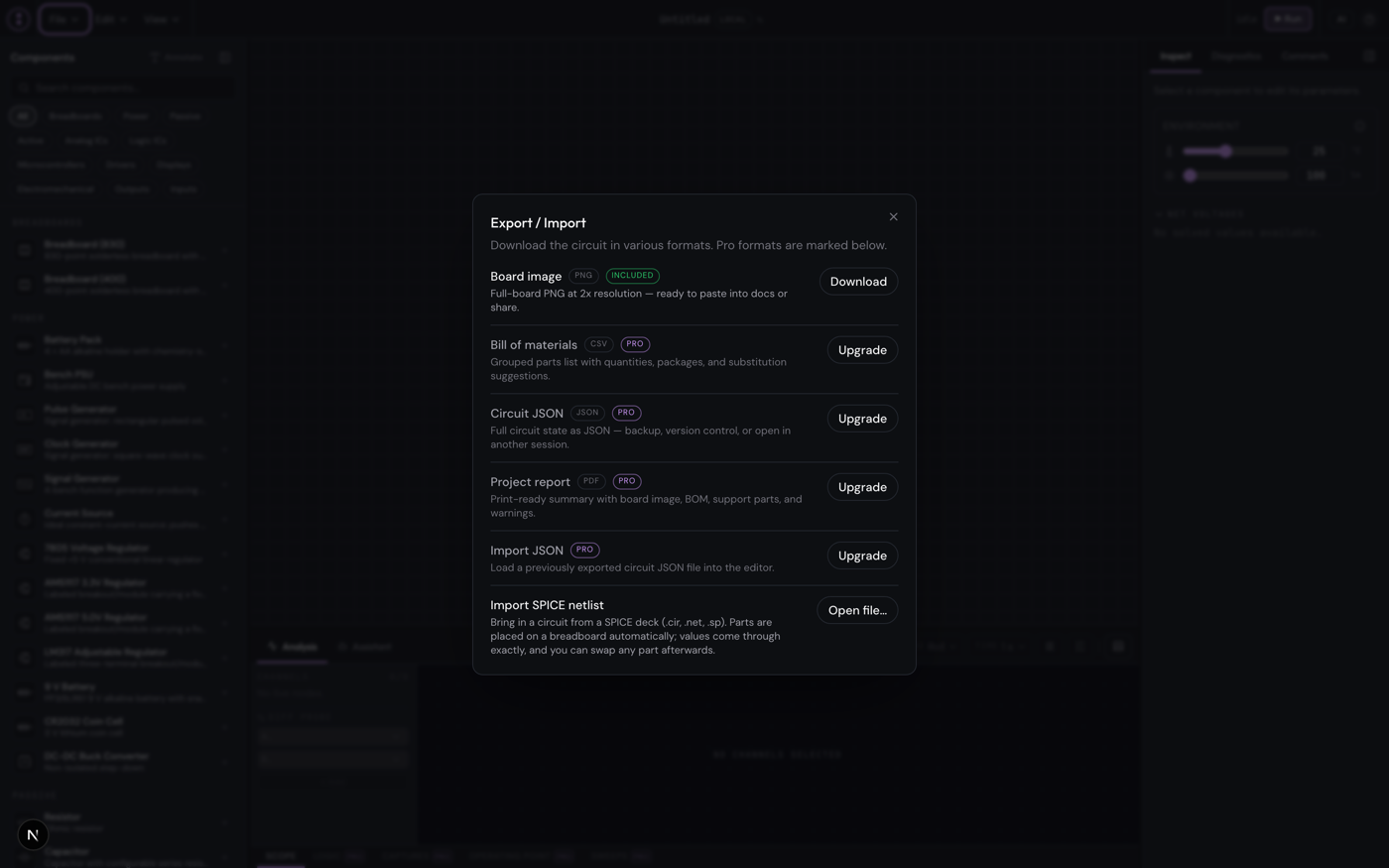
Board image (PNG), included for everyone
The board image export renders your layout at 2x resolution, entirely in your browser, cropped to the circuit including any labels and annotations you placed. If you switched on View → Node highlighting → Show all nodes, the export includes the node names too, which turns a screenshot into a labelled figure. Guests included, no account needed: if you build something in a guest session and want to keep evidence, this is your format.
Bill of materials (CSV), Pro
The BOM is a grouped shopping list, not a component dump. Interchangeable parts collapse into one line keyed off their electrical identity, so ten 220 Ω 5% resistors are one line with quantity ten. Columns cover quantity, item, type, family, package, mounting, ratings, tolerance, substitutions, and which component references in your circuit the line covers.
Two design choices worth knowing. First, the BOM adds support parts you did not place but will need at the bench: DIP sockets for your chips, decoupling capacitors, jumper wire, a USB cable, marked as support rows. Second, bench equipment (the PSU, signal generators) is treated as test gear and left off the list, because you own those, you do not buy them per project. There are deliberately no vendor links or prices; it is a parts list, not an affiliate scheme.
Circuit JSON, Pro, both directions
Export writes the complete circuit state to a .json file; Import JSON loads one back. This is the backup format, the version-control format, and the "email it to yourself before trying something drastic" format. An invalid file is rejected with a message rather than half-loading into your work. If you keep coursework in git, one JSON per milestone is a perfectly civilised workflow.
Related but different: sharing a live, read-only link to a project is its own feature (private share links, also Pro), documented at docs.devoltapp.com/user/sharing-projects. Export is for files you control.
Project report (PDF), Pro
The report is the everything-format for handing in or archiving: project name and timestamp, a summary count of components, wires, nets, and warnings, the board image, the full BOM including support parts, and any design warnings the diagnostics raised (an LED missing its series resistor, an IC without decoupling). If the simulation is running or paused when you export, the report can also include an operating-point table of node voltages and currents, plus any oscilloscope captures you marked for inclusion. Teachers: one file, the whole story, including the warnings your student hoped you would not see.
The odd one out: SPICE import, free
The same dialog imports SPICE netlists (.cir, .net, .sp) on every plan, rebuilding the deck as a placed, wired breadboard. It gets a full post of its own later this week, because it deserves one.
A workflow that uses three of these
Our habit for anything worth keeping: export JSON when the circuit first works (backup), PNG when it is worth showing (documentation), and the PDF report when it is finished (the record, warnings and all). The whole set is documented at docs.devoltapp.com/user/exporting. Tomorrow: the RP2040's ADC reads the potentiometer, and a knob finally controls some code.