blog · 12 August 2026
Measuring distance in microseconds: the HC-SR04 and a micro:bit
Wire the ultrasonic sensor to a micro:bit, time its echo pulse with time_pulse_us, and check the 58 microseconds-per-centimetre arithmetic against the Inspector's distance slider.
The HC-SR04 is the classroom's favourite sensor because it hides nothing: you ping, it answers, and the answer is literally a pulse whose width is the distance. de:volt's version implements the actual protocol down to the microsecond, and its Inspector card lets you move the target, so today we measure distance with code and check the code with a slider.
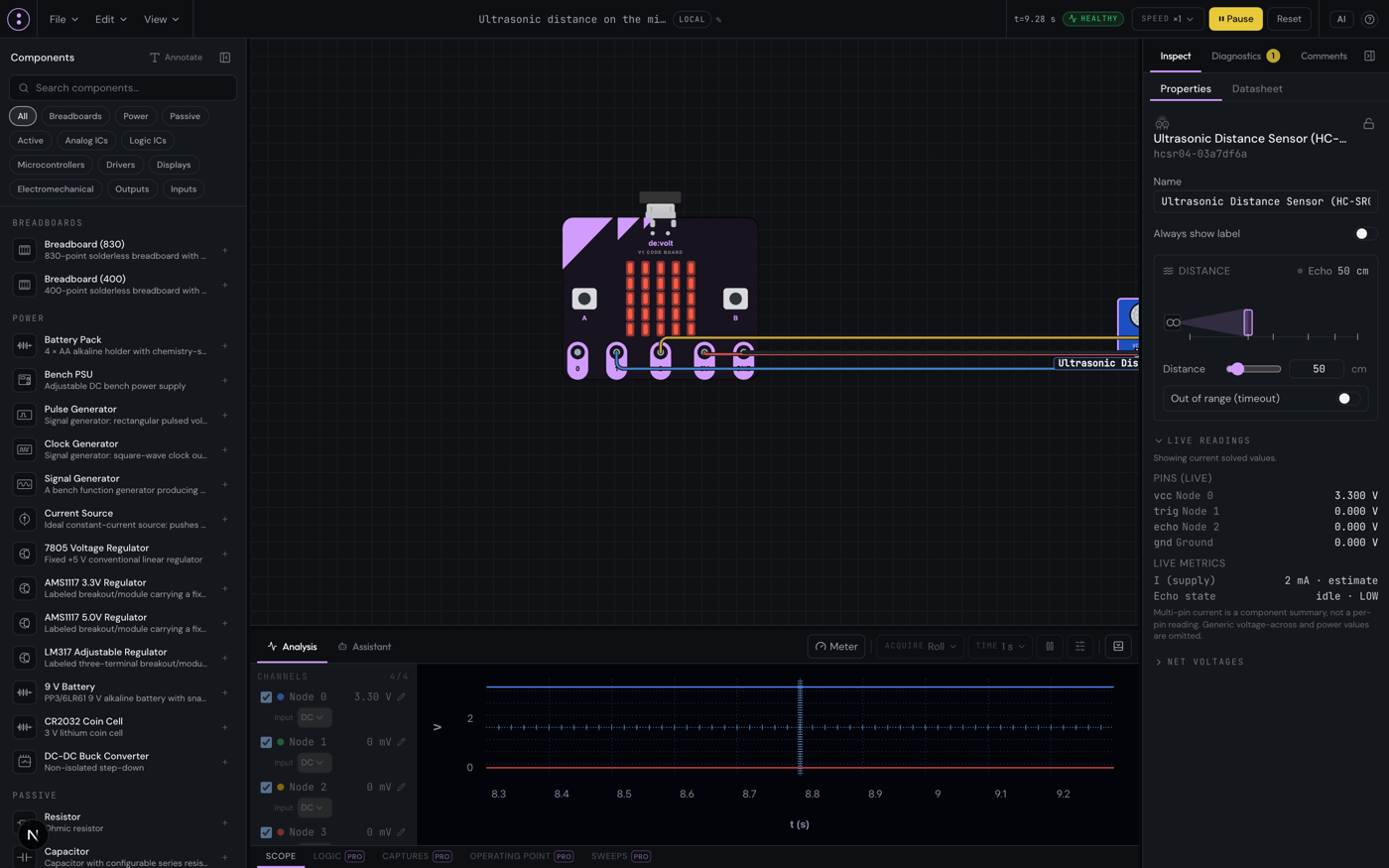
The wiring
At sim.devoltapp.com, place a BBC micro:bit V1 and search the palette for "ultrasonic" (or "sonar", both work) to place the Ultrasonic Distance Sensor (HC-SR04). Four wires, pad to pin:
- micro:bit 3V → sensor VCC. The catalog's HC-SR04 is the wide-supply variant, happy from 3.0 to 5.5 V, so a 3.3 V board drives it directly. The classic 5 V-only version's caveat is on the datasheet page, worth a mention in class.
- micro:bit GND → sensor GND
- micro:bit P1 → sensor TRIG
- micro:bit P2 → sensor ECHO
The protocol, in one paragraph
Drive TRIG high briefly, and the sensor emits an ultrasonic burst and raises ECHO for a time proportional to the round trip: 58 microseconds per centimetre of distance. No target in range? ECHO stays up about 38 ms as a timeout, then gives up. That is the whole interface, and it is why the part appears in every microcontroller curriculum: it turns "measure a distance" into "measure a pulse width", which any board can do.
The code
Select the board, open the Code tab, and run:
from microbit import *
from machine import time_pulse_us

while True:
    pin1.write_digital(1)
    pin1.write_digital(0)
    echo = time_pulse_us(pin2, 1, 40000)
    if echo > 0:
        cm = echo // 58
        display.scroll(str(cm))
    sleep(300)
time_pulse_us waits for ECHO to go high and returns the microseconds it stayed there, or a negative number on timeout. The scroll shows centimetres.
Now move the target
Select the sensor. Its Inspector card is a Distance control: a ruler with a draggable target from 2 to 400 cm, plus a numeric box, plus an Out of range (timeout) switch. Set it to 10 cm and the display scrolls 10. Set 100 and it scrolls 100. Put the scope on the ECHO node and freeze after a ping: cursors read the pulse at 580 µs for 10 cm and 5,800 µs for 100 cm, the 58 µs/cm arithmetic made visible. The sensor's timing model is test-pinned to exactly those figures.
Flip the timeout switch and the code's echo > 0 branch stops firing: your error handling just got tested without anyone walking out of the room, which is the advantage of a slider over a hallway.
Two teaching notes
First, the division by 58 is worth unpacking once: sound covers about 343 metres per second, the pulse covers the distance twice, and 2 ÷ 34,300 cm/s is 58.3 µs per centimetre. Let students derive it before you hand them the constant. Second, the sensor needs a trigger pulse and settling time between pings; the sleep(300) is not decoration, and shrinking it too far on real hardware produces the exact flaky readings the timeout switch teaches you to catch. On a physical sensor, also hold TRIG high for about 10 µs before dropping it; the simulated part accepts the short pulse above, real ones can be pickier.
The same wiring works on the RP2040 board (machine.time_pulse_us is the same call) and on the Arduino UNO with pulseIn. The sensor's full timing model and electrical notes are at docs.devoltapp.com/parts/sensors. Tomorrow: the multimeter's four modes, and the difference between OL and a dash.