changelog · 26 November 2026
Program an FPGA in your browser: the UPduino v3.1 joins de:volt
Write Verilog, press Synthesize, and watch your design run on a simulated iCE40 FPGA that drives real breadboard circuits. No toolchain to install, no board to buy.
Microcontrollers run a program one instruction at a time. An FPGA is different: you describe hardware, and the chip becomes that hardware, with every part of your design working at once. It is how digital logic is taught at university and how a lot of real products are built, but getting started has always meant installing a large toolchain and buying a board.
Not any more. The UPduino v3.1, a popular, low-cost board built around a Lattice iCE40 UP5K FPGA, is now in the de:volt parts catalog.
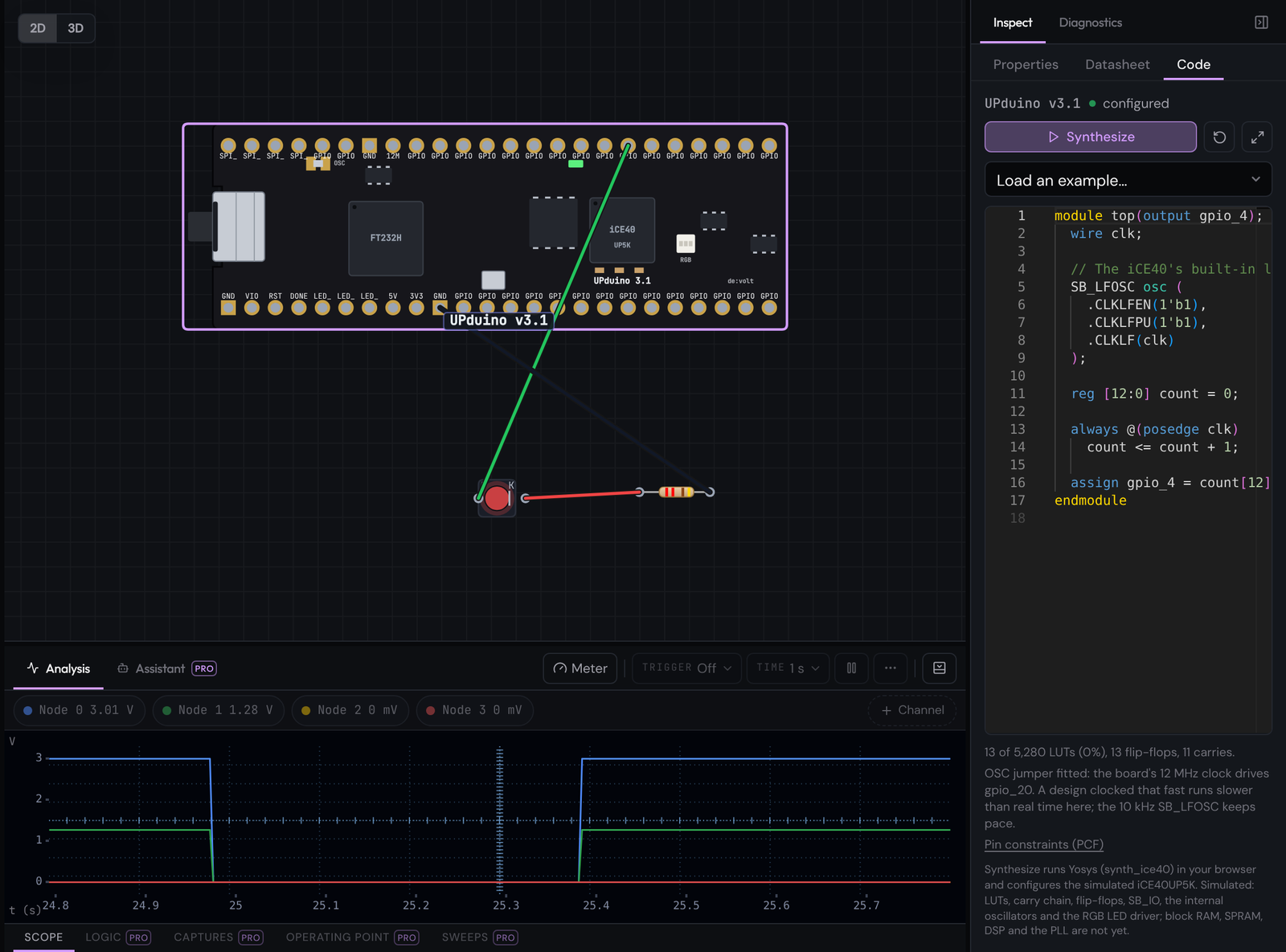
From Verilog to running hardware, in the browser
Select the UPduino and open the Code tab in the Inspector. Write your design in Verilog, or pick one from Load an example... to start. Then press Synthesize.
de:volt turns your Verilog into a configuration for the iCE40 right there in your browser, using the open-source Yosys synthesis tool, and loads it into the simulated chip. A moment later your design is running, and its pins drive whatever you have wired to them: LEDs, buttons, displays, or other chips on the breadboard.
After synthesis you can see how much of the chip your design uses, for example 13 of 5,280 LUTs (0%), 13 flip-flops, 11 carries for a simple LED blinker, the same kind of report a professional FPGA tool gives you.
What's on the board
The simulated UPduino has what you need for real projects:
- The iCE40's logic cells (LUTs), flip-flops and carry chains, and its programmable I/O with pull-ups.
- The board's 12 MHz clock, the chip's built-in oscillators, and its RGB LED driver.
- Easy pin mapping: name a port after its pin, like
gpio_4, and it is connected for you, or use a pin constraints file (PCF) to choose which signal goes to which pin.
Block RAM, SPRAM, the DSP blocks and the PLL aren't simulated yet.
Honest about speed
An FPGA does everything in parallel, which is a lot of work to simulate. Designs clocked at the full 12 MHz will run slower than real time in your browser, and the editor tells you when that is happening. For blinking, counting and learning, the chip's slower built-in oscillator keeps things at real speed.
The editor is also honest when a design can't work. If your logic feeds back on itself and never settles, de:volt stops the design and explains what went wrong, rather than producing a mysterious result.
Why it matters for learning
With a microcontroller and an FPGA side by side in the same catalog, de:volt can now take a student all the way from "light an LED" to designing their own digital hardware, on the same breadboard, in the same browser tab. Teachers can set an FPGA exercise without a single board to hand out or a single install to support.
New to FPGAs? Our beginner's guide explains what they are and walks through a first blinker.
Find the UPduino v3.1 in the parts list at sim.devoltapp.com and press Synthesize.